
Every employer operating a PAYE scheme must issue a P60 to every employee still in their employment on 5 April, with a firm deadline of 31 May [1]. Missing that date is a compliance failure. For employees, the P60 is the single most trusted document for proving annual earnings, used by mortgage lenders, HMRC and benefits agencies alike.
The P60 is not a payslip. A payslip covers a single pay period. The P60 summarises the entire tax year: total gross pay, income tax deducted, National Insurance contributions across three earnings bands, all six categories of statutory payment where applicable, and any student or postgraduate loan deductions made via payroll [2]. All of that information sits inside a single document, produced once a year by the employer's payroll software.
This guide covers what the P60 contains, who must receive one, how employees use it, what to do when one goes missing or contains an error, and what payroll software must produce to meet the HMRC specification.
Key takeaways
- Every employer must issue a P60 to each employee still on payroll on 5 April, by no later than 31 May [1].
- The P60 now includes six statutory payment categories: SMP, SPP, ShPP, SAP, SPBP and SNCP. Statutory Neonatal Care Pay is the most recently added field.
- Employees on sick leave, maternity leave or parental leave who have not resigned are still in employment on 5 April and must receive a P60 [2].
- Digital P60s are fully legal and widely accepted by lenders and HMRC.
- An inaccurate payrun produces an inaccurate P60: the certificate is a downstream output of the payroll record.
What the P60 Is
The P60 is the end-of-year certificate an employer generates for every employee in employment on 5 April, the final day of the UK tax year [1]. The current form version for the 2026-27 tax year is HMRC 12/25, covering the year ending 5 April 2027 [3].
HMRC does not produce P60s. The employer's payroll software generates the form from the payroll records accumulated during the year. UK payroll software that holds the HMRC Recognised badge must generate P60s that comply with the official field specification and, where issued digitally, meet HMRC's standards for electronic issuance.
Who must receive a P60
Only employees in employment on 5 April receive a P60 [2]. Employees who left the employer during the tax year receive a P45 at the point of departure instead, so a P60 is not issued to them.
Several categories of employee are commonly overlooked at year end:
- Employees on long-term sick leave who have not formally resigned remain in employment and must receive a P60 [2].
- Employees on maternity, paternity, adoption or shared parental leave retain their employment status throughout the leave period.
- Employees on secondment abroad remain employed by the UK entity and fall within the same rule.
- Occupational pensioners receiving a pension from a former employer receive a P60 for that pension income, because PAYE applies to occupational pension payments in the same way as employment income [3].
An employer who employed the same worker more than once during the tax year issues a single P60, incorporating the combined figures from both periods of employment.
The 31 May deadline
The law sets 31 May as the latest date for issuing the P60 [1]. For the 2026-27 tax year, that falls on 31 May 2027. The deadline applies regardless of whether the P60 is issued on paper or electronically.
Where a P60 contains an error after issue, the employer must provide a correction in a letter setting out the amendment or in a new P60 marked "Replacement" [5]. Employers must not issue a second P60 for the same tax year and the same employment without clearly marking it as a replacement, as duplicate documents create confusion for lenders and HMRC alike.
What the P60 Contains
The P60 is a structured document with a fixed set of fields specified by HMRC. Each section draws on data accumulated through the payroll year.
Pay and tax in this employment
The core of the P60 shows the employee's total taxable pay and the total income tax deducted across the tax year [1]. Where the employee had a previous employer in the same tax year, the P45 from that employer was used at the point of joining. The P60 then presents cumulative figures: pay and tax from the previous employment combined with pay and tax from the current employment [3].
The P60 also records the final tax code in use at year end. For most employees in England and Northern Ireland, that is `1257L`, reflecting the Personal Allowance of £12,570 [9]. Employees who received an adjustment to their allowance, such as those with a taxable benefit in kind or underpaid tax carried forward from a prior year, will see a different code on their certificate.
National Insurance contributions
The P60 records the employee's NI category letter and contributions across three earnings bands for the tax year [10]. The three bands in the 2026-27 tax year are set by the following annual thresholds:
| Threshold | Annual amount | Significance |
|---|---|---|
| Lower Earnings Limit (LEL) | £6,708 | Earnings at or above this level count towards the NI record, even though no contributions are due [4] |
| Primary Threshold (PT) | £12,570 | Employee contributions of 8% begin above this point [10] |
| Upper Earnings Limit (UEL) | £50,270 | Employee contributions fall to 2% on earnings above this point [10] |
The P60 shows the total employee NI contributions paid during the year. Employer NI contributions do not appear on the employee's P60, because employer NI is not deducted from the employee's pay; it is an additional cost borne by the employer above the gross wage.
The NI category letter identifies the contribution status applicable throughout the year. Category A is the standard letter for most employees; category M applies to employees under 21; category H applies to apprentices under 25 [10]. An employee who changed category during the year, for example by turning 21, may see the most recent applicable letter reflected on the P60.
Statutory payments
All statutory payments made during the year are included within the gross pay figure on the P60, but the form also lists each payment type separately [2]. This allows the employee and any third party (a lender, HMRC or a benefits agency) to see the precise composition of the total earnings figure.
The six statutory payment types that must appear on the P60 are:
| Code | Statutory payment | 2026-27 rate |
|---|---|---|
| SMP | Statutory Maternity Pay | 90% AWE for weeks 1 to 6; £194.32/week thereafter [12] |
| SPP | Statutory Paternity Pay | £194.32/week |
| SSPP | Statutory Shared Parental Pay | £194.32/week |
| SAP | Statutory Adoption Pay | 90% AWE for weeks 1 to 6; £194.32/week thereafter |
| SPBP | Statutory Parental Bereavement Pay | £194.32/week |
| SNCP | Statutory Neonatal Care Pay | £194.32/week [13] |
Statutory Neonatal Care Pay is the most recently introduced statutory payment category in UK payroll. Many older P60 templates predate its inclusion and do not allocate the correct field on the certificate. HMRC-recognised payroll software for the 2026-27 tax year must reflect all six categories as they stand in the current specification.
Statutory Sick Pay is included in gross pay but is not broken out as a separate named line on the P60 in the way the six family-related payments are.
Student and postgraduate loan deductions
Where the employer has made student loan deductions via payroll during the year, the P60 records the total in whole pounds [14]. Postgraduate Loan deductions appear as a separate figure alongside the student loan total.
The 2026-27 tax year introduced Plan 5 for English students from the 2023 entry cohort [15]. Payroll software handling Plan 5 deductions must record those separately from Plan 1 and Plan 2 deductions and reflect the correct plan in the year-end output. Employees with both a student loan and a postgraduate loan will see two separate deduction figures on their P60.
Every box on the P60, explained
Here is the official 2026-27 certificate itself, zone by zone. The header carries the two instructions that matter most: the tax year it certifies (to 5 April 2027) and the words 'Do not destroy'. The official guidance lives on GOV.UK. Crown copyright, reproduced under the Open Government Licence v3.0.
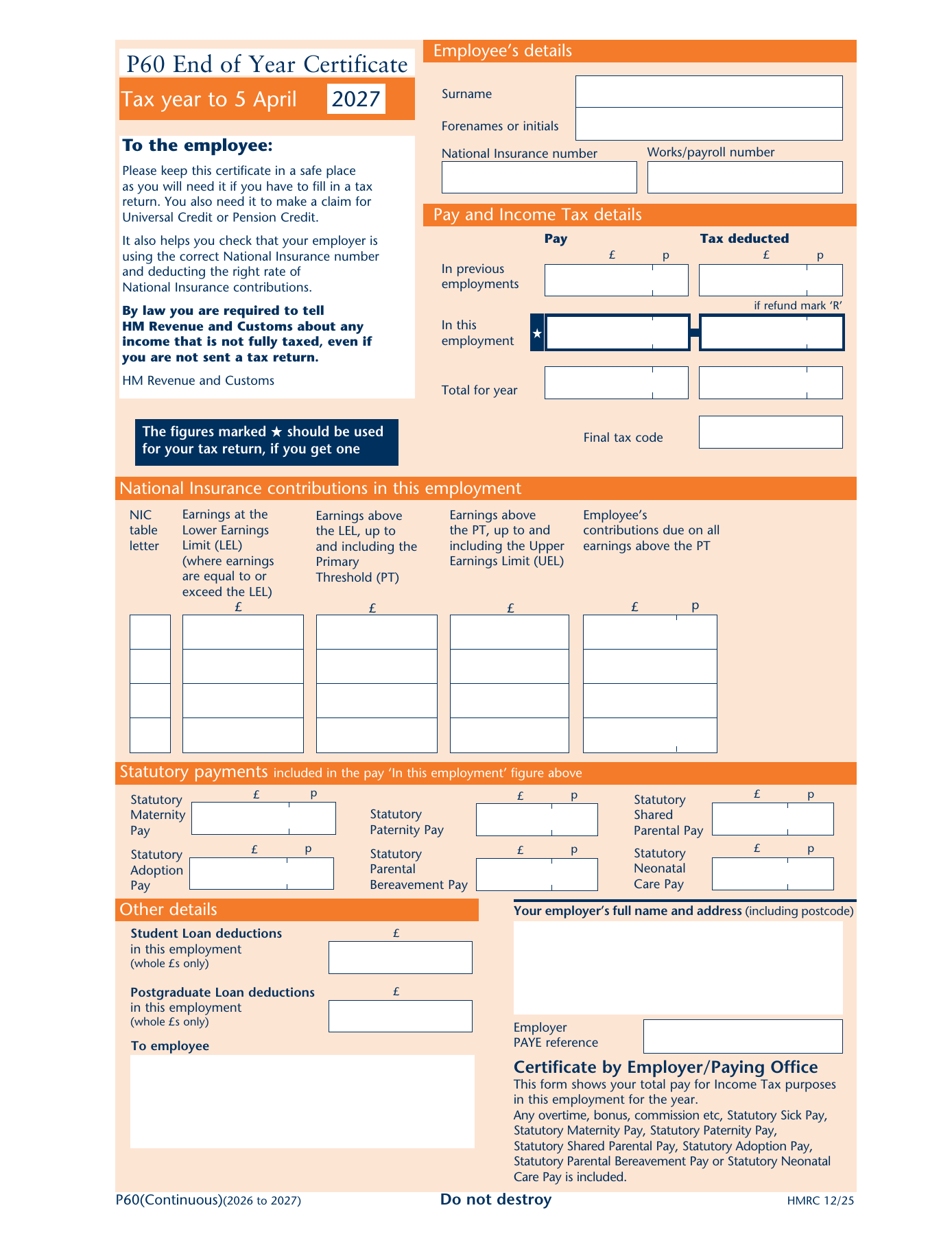
Employee details, pay and Income Tax
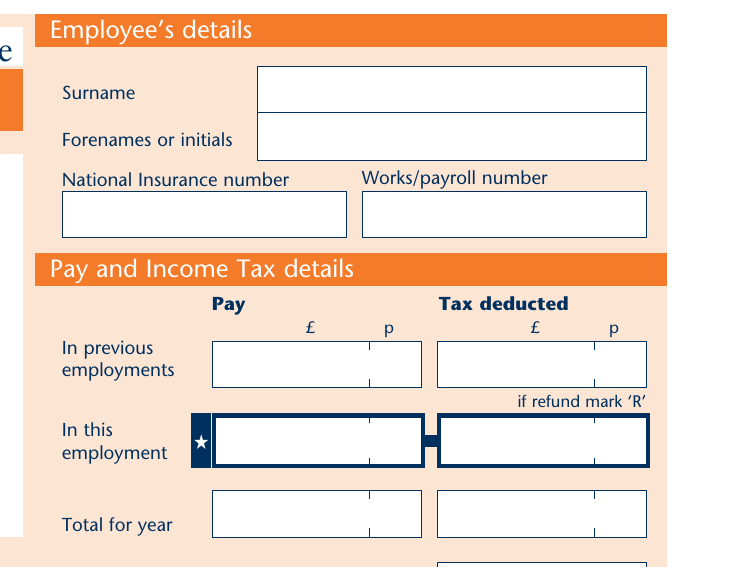
Check it every year: a wrong one means your contributions may be crediting someone else's State Pension record.
Pay and tax with this employer, the starred figures to use on a tax return if you get one.
Pay and tax from earlier jobs in the same tax year, carried in from your P45; 'Total for year' adds the two rows.
Beside a tax figure, 'R' means a refund: this employer repaid you tax rather than deducting it.
The code in operation at 5 April, your starting point for checking next year's code makes sense.
National Insurance contributions in this employment
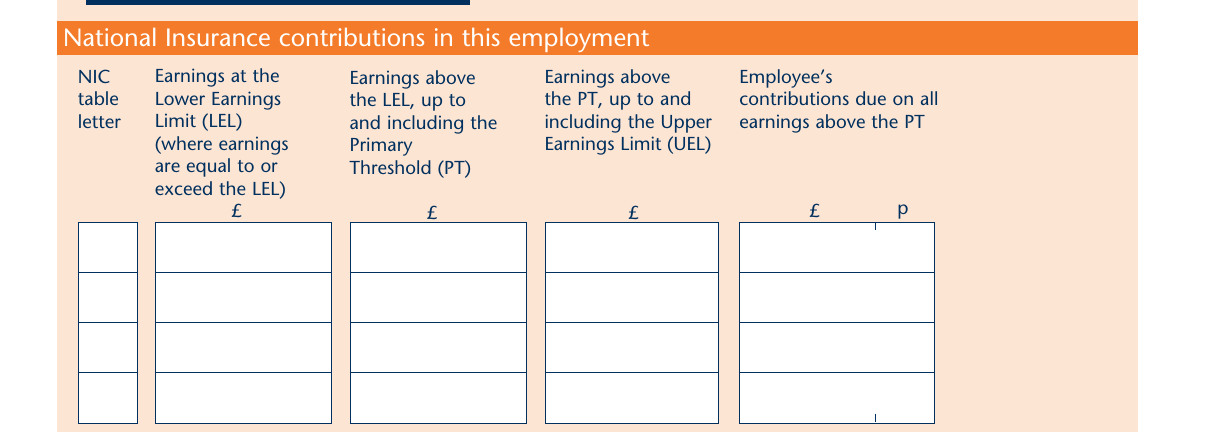
One row per National Insurance category you were on during the year: A for most employees, extra rows if your category changed.
Earnings at the Lower Earnings Limit. The column that protects benefit entitlement: these earnings earn qualifying credit even though no contributions were due.
Earnings between the LEL and the Primary Threshold, still contribution-free.
Earnings between the Primary Threshold and the Upper Earnings Limit, the band on which the main NIC rate applies.
The contributions actually deducted on everything above the PT.
Statutory payments

Statutory Maternity, Paternity and Shared Parental Pay received, already included in the 'In this employment' pay figure.
Statutory Adoption, Parental Bereavement and Neonatal Care Pay. Statutory Sick Pay is inside the pay total too but has no box of its own. These figures matter for benefit claims and for reconciling parental pay against bank statements.
Other details and the employer certificate
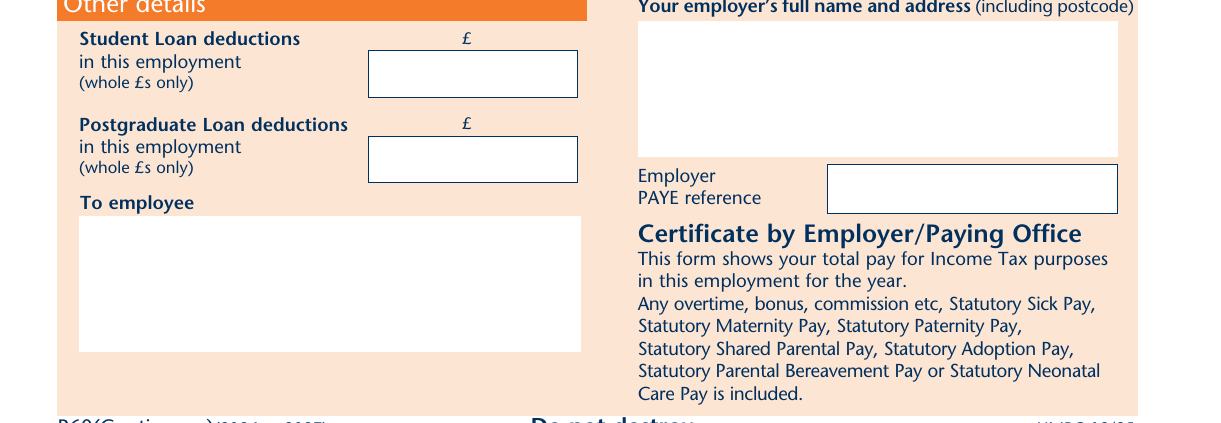
Deductions in whole pounds only, which is why they rarely match your payslips to the penny. Same for the Postgraduate Loan box below it.
The employer's full name, address and PAYE reference, plus the certificate wording confirming that overtime, bonuses, commission and every statutory payment are inside the pay figure.
The deadline: employers must give a P60 to everyone employed on 5 April by 31 May, on paper or electronically.
How Employees Use the P60
The P60 serves as the authoritative statement of an employee's earnings and deductions for an entire tax year. Its practical uses extend well beyond satisfying an annual compliance requirement.
Mortgage and loan applications
Mortgage lenders treat the P60 as the most reliable documentary evidence of annual employed income. Most residential mortgage providers request at least two consecutive P60s to confirm sustained earnings [6]. The certificate confirms total pay, the employer's PAYE reference number, and the employee's National Insurance number, all of which lenders cross-reference against bank statements and credit checks [8].
An employee who applies for a mortgage shortly after 5 April but before 31 May may not yet have received their P60 for the most recent tax year. In that period, payslips are often accepted as a bridging document. Once issued, the P60 replaces them as the primary year-end income proof.
Self Assessment tax returns
Employees filing a Self Assessment return use the P60 as the primary source for employment income figures [16]. The SA102 Employment supplementary pages ask directly for the figures from the P60: total pay in this employment, total tax deducted, and the final tax code at year end.
Employees who receive income from employment alongside other taxable sources, such as rental income, investment income or self-employment profit, need both the P60 and a Self Assessment return to report the full picture to HMRC [8]. The P60 is the bridge between the PAYE system and the Self Assessment system for that category of taxpayer.
What Happens When a P60 Is Lost or Wrong
Requesting a replacement
An employee who loses a P60 cannot obtain a replacement directly from HMRC [7]. The primary route is to ask the employer for a replacement copy. If the employer cannot provide one, the employee can use the HMRC personal tax account or the HMRC app, both of which display the information that would appear on a P60 for recent tax years [7].
This contrasts with the P45, where no replacement route exists at all [6]. The P60 therefore has two fallback routes (the employer and the HMRC personal tax account), making it the more recoverable of the two documents.
Correcting a P60 error
An incorrect P60 arises when the underlying payroll records contain an error: a wrong pay figure, an incorrect tax code applied, a missed statutory payment, or a student loan deduction made against the wrong plan. Correcting the P60 begins with correcting the payroll records and then reissuing the certificate marked "Replacement" [5].
The employer must not issue a second P60 for the same tax year and the same employment without the "Replacement" label, as duplicate documents create reconciliation problems for lenders and for HMRC. Where the error affects the tax or NI figures materially, the employer may also need to submit a corrected Full Payment Submission through Real Time Information to bring HMRC's records into alignment with the corrected P60 [3].
P60 and Payroll Software
The P60 is a downstream output of the payroll process. An employer who runs an accurate payroll throughout the year produces an accurate P60 automatically at year end. An employer whose payroll carries unresolved errors propagates those errors onto the employee's official year-end record.
Payroll software that holds the HMRC Recognised badge is required to generate P60s that match the current HMRC field specification, which is revised annually to reflect changes in statutory payment categories, threshold values and form layout [5]. The Moonworkers payroll API generates P60-compatible output as part of the year-end payroll close, with all six statutory payment fields populated and student loan deductions recorded by plan type.
Accountants and payroll bureaux managing multiple employer schemes benefit from a multi-client payroll platform that can produce and deliver P60s in bulk at year end without manual steps per employer.
Conclusion
The P60 is the year-end document that closes the PAYE record for every employee still in employment on 5 April. It is produced by the employer's payroll software, issued by 31 May, and relied upon by employees for mortgages, Self Assessment returns and benefits claims. The accuracy of the P60 depends entirely on the accuracy of the payroll run throughout the year.
The addition of Statutory Neonatal Care Pay to the mandatory P60 fields in recent years illustrates how the certificate keeps pace with expanding statutory obligations. Payroll software must remain aligned with the current HMRC field specification to ensure every P60 issued is complete and will be accepted by the third parties employees present it to.
Frequently asked questions
What is the difference between a P60 and a P45?
A P60 is issued annually to every employee still in employment on 5 April and covers the full tax year. A P45 is issued when an employee leaves a job and covers the period from 6 April to the date of departure. An employee cannot receive both documents from the same employer for the same period [6]. For a full explanation of the P45, see the Moonworkers guide to what a P45 is.
Does every employee get a P60?
Only employees still in employment on 5 April receive a P60 [1]. Employees who left during the tax year receive a P45 at departure instead. Employees on sick leave, maternity leave or parental leave who have not formally left employment are still in scope for a P60, regardless of whether they received taxable pay during the year.
Can an employer issue a digital P60?
A digital P60 is fully legal in the UK and has been accepted by HMRC for a number of years [2]. The employer must ensure the employee can access, print or share the digital document as required. Most mortgage lenders now accept a PDF equivalent, provided it contains all mandatory fields. Some lenders may also request supporting payslips for the same period.
What should an employee do if their P60 shows the wrong income figure?
The employee should contact the employer's payroll team to identify the source of the discrepancy. Where the payroll records are wrong, the employer corrects the underlying payrun, submits any necessary Real Time Information amendments to HMRC, and reissues the P60 marked "Replacement" [5]. Where the employee believes the employer's records are correct but HMRC's own records differ, the employee can raise a query through the HMRC personal tax account or the Self Assessment telephone helpline.